TTL Explained: How Automatic Expiry Actually Deletes Your Data
A 7-day TTL on the same 6M synthetic rows: dropping expired day partitions took 6.3 ms; rewriting mixed-age files took 893.3 ms — 140.8× longer. Here's why alignment matters.
Share

A TTL is one line of configuration. The delete it triggers is not. You write “keep 7 days” and assume old data quietly disappears. Something still has to find the expired rows and give the space back, and how it does that decides whether expiry costs 7 milliseconds or a job that reads and rewrites most of your dataset.
Earlier editions covered policy: which data belongs on which tier. This one is mechanics: once policy says “expire”, what does the engine physically do?
Two ways to reclaim space
Every analytics store keeps data in units: a partition, a part, a file, a segment. TTL reclaims space through one of two paths.
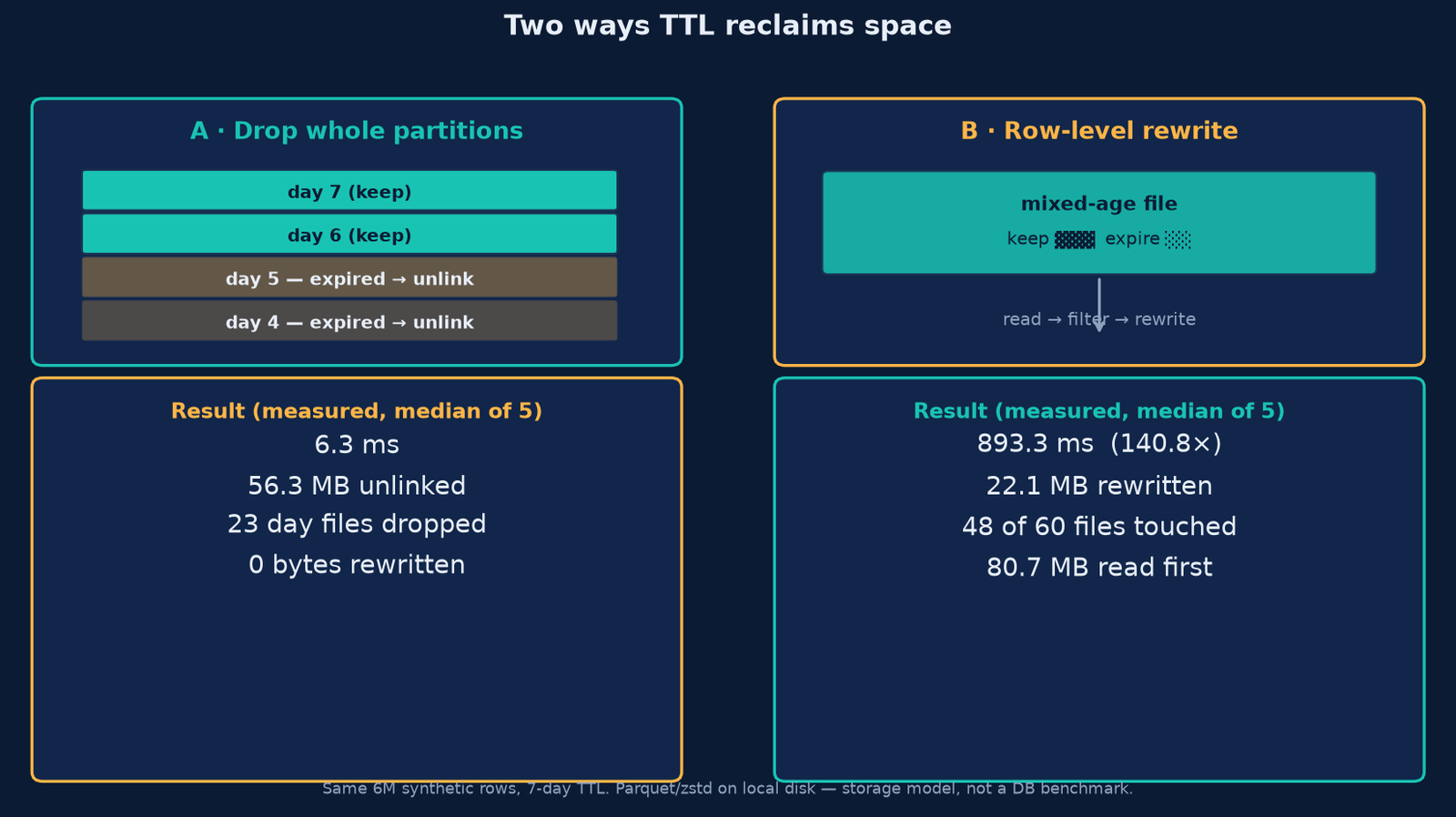
- Drop whole units. If a unit holds only expired rows, the engine can unlink it. That is metadata work: the bytes are never read, decompressed or rewritten.
- Rewrite row by row. If a unit mixes expired and live rows, the engine must read the whole unit, filter the expired rows, and write back the survivors — unchanged, but rewritten.
Whether an engine can take it depends on your layout.
Our experiment: one dataset, three layouts
We generated 30 days of synthetic observability events, 200,000 rows per day, 6,000,000 rows total, written as Parquet with zstd using pyarrow and a fixed seed (20261107). The 7-day TTL keeps the newest 7 days and expires the older 23, so the cutoff is 2026-11-01.
Same rows, three ways:
- Daily partitions: 30 files, 73.48 MB. One file per day, so every file has a single age.
- Weekly partitions: 5 files, 64.42 MB. Coarser, so files mix ages.
- Mixed-age batches: 60 files, 80.73 MB. Each batch mixes 5 random days, the pattern you get when a pipeline flushes on size rather than time.
A synthetic storage model on local disk — read the ratios, not the absolute times.
Result: dropping beat rewriting by 141×
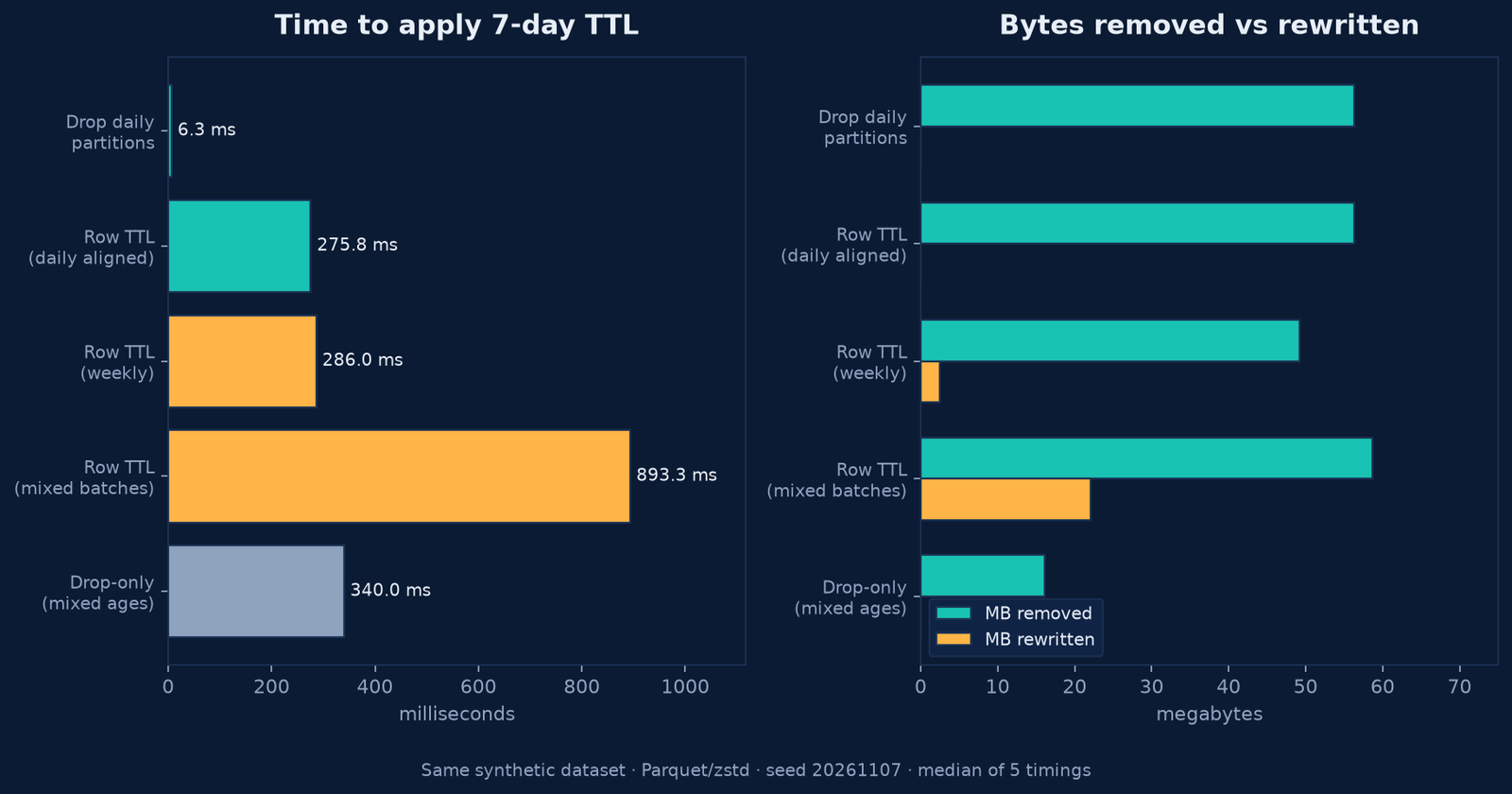
Dropping the 23 expired daily partitions took 6.3 milliseconds. It removed 56.32 MB, dropped 23 files, and rewrote zero bytes. Nothing was read.
Row-level TTL across the mixed-age batches took 893.3 milliseconds. It removed 58.63 MB, but only by reading all 80.73 MB first and writing 22.1 MB back out. 48 of the 60 files were rewritten — a 140.8× speedup for the drop path.
Weekly files sat in between: 286.0 ms, 45.1× slower than the drop, because one partially expired week had to be rewritten (2.45 MB, 1 of 5 files).
Daily partitions with row-level TTL still scanned each file (275.8 ms, read 73.48 MB) then dropped the same 23 files: nothing to rewrite, but paid to look.
The trap: drop-only leaves rows behind
If you only ever drop units that are entirely expired, you never rewrite anything — and you never enforce the TTL.
- On mixed ages, drop-only removed just 16.16 MB and dropped 12 of 60 files. 4,800,000 rows survived when 1,500,000 should have after a correct rewrite.
- On weekly files, drop-only removed 36.69 MB and left 2,600,000 rows instead of 1,400,000.
So the fast path and the correct path are not the same path, unless your layout makes them the same.
Alignment is the whole game
Daily partitions make every file single-aged. When a day expires, its file is entirely expired, so row-level TTL and partition drop converge on the same action: unlink it. We got row-level correctness at the cost of a file drop.
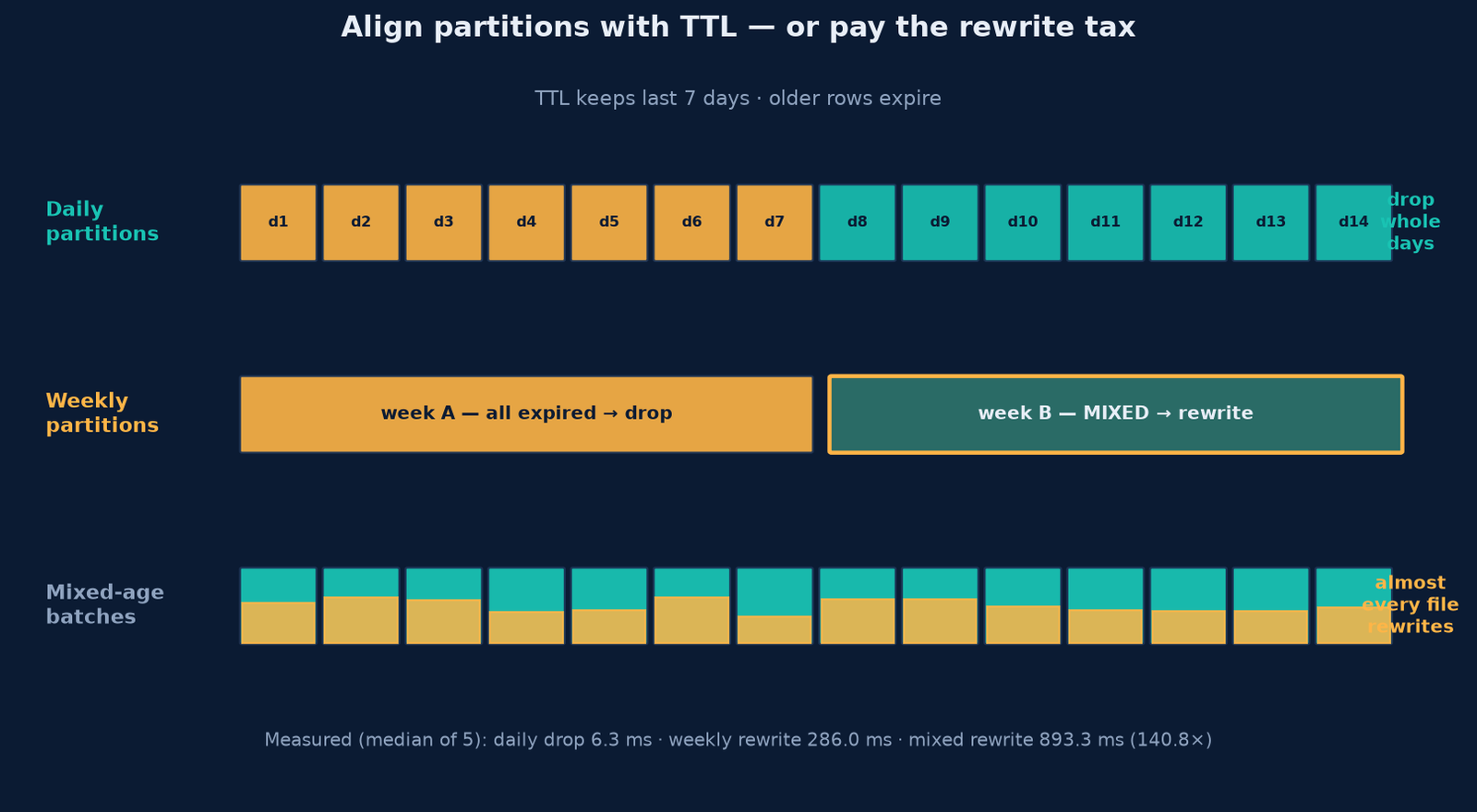
The rule: make the partition grain equal to, or a divisor of, the TTL window. A 7-day TTL over daily partitions is clean. Over weekly partitions, one boundary week lands in the rewrite path. Over monthly partitions, almost everything does, because a month is far wider than the window.
Prefer a grain finer than your window — changing grain later means rewriting history.
What the public docs say
This is not specific to one engine.
- ClickHouse evaluates MergeTree TTL during background merges, not at insert, so expired rows can stay visible past their expiry. Its ttl_only_drop_parts setting is off by default; when on, a part is dropped only if every row in it is expired. The TTL operations guide says it plainly: partition by the same time field your TTL uses.
- Iceberg splits this into separate jobs. Expiring snapshots removes old snapshot metadata; deleting orphan files is a distinct operation, with a default orphan age of 3 days.
- Delta Lake reclaims with VACUUM, removing unreferenced files older than a retention threshold, 7 days by default.
Note the pattern: a logical delete marks rows gone and leaves the bytes. Physical reclamation is a separate, scheduled step with its own retention clock.
Expiry is not instantaneous
Two delays matter before you promise a retention guarantee. First, engines that expire during merges only expire when a merge happens. ClickHouse’s knowledge base gives merge_with_ttl_timeout a default of 14400 seconds, which is 4 hours; a quiet table with no merge pressure can hold expired rows a while.
Second, a rewrite competes for the same I/O as your queries. The 893 ms above was a small dataset on an idle box: if rewriting touches 80% of your bytes, you have a recurring job reading and rewriting 80% of your data.
Try it: TTL alignment estimator
How much of your expiry is a free drop, and how much forces a rewrite?
TTL alignment estimator
See how much of your expiry is a clean drop, and how much lands in the rewrite path.
Expired days
–
Parts if one per grain
–
Fully droppable parts
–
Mixed days in the boundary part
–
MB reclaimed by dropping only
–
MB in the part needing a rewrite
–
Share of bytes that are a clean drop
Boundary parts to rewrite
–
Plain arithmetic on a simplified model. Expired days = days on disk − TTL days. Parts = days on disk ÷ grain, rounded up. Droppable parts = expired days ÷ grain, rounded down; the remainder is the boundary part that also holds live rows. Rewrite MB assumes one boundary part when a remainder exists. Alignment: no remainder is Aligned, under half a grain is Boundary rewrite, half or more is Badly mixed. Assumes one part per grain, uniform bytes per day, and dropped parts unlinked without being read. Real engines vary.
A practical checklist
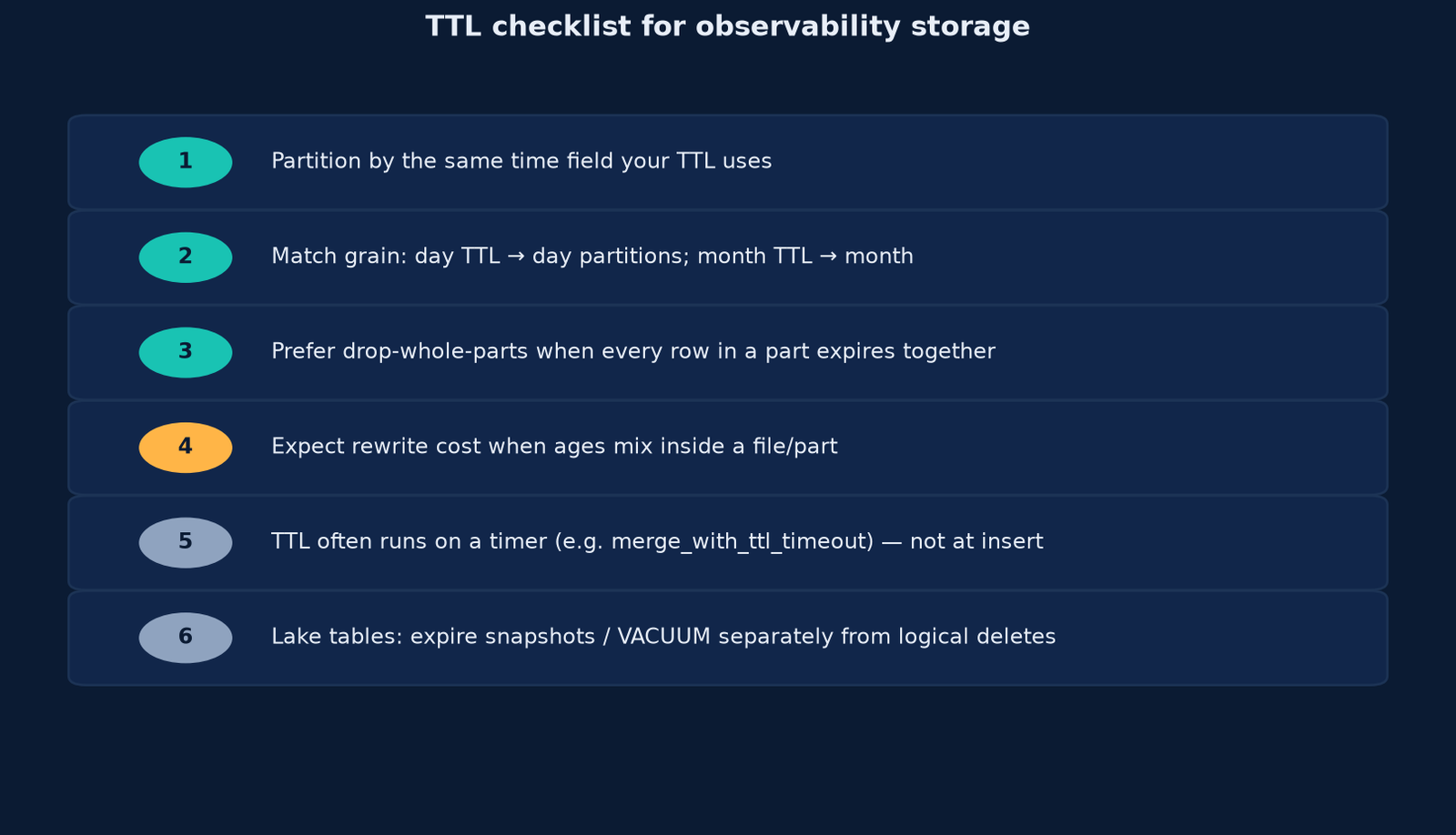
- Partition by the field your TTL reads. TTL on
event_timeneeds partitioning onevent_time; any other field turns expiry into a scan. - Match the grain to the window. The grain should divide the TTL. Daily partitions for a 7-day TTL is clean; monthly is not.
- Prefer whole-unit drops. Enable drop-only where the engine offers it, then confirm the row counts you expect.
- Budget the rewrite. Measure the share of bytes in partially expired units. That share is your recurring TTL cost.
- Know your timer. Expiry is scheduled, not instant. Find the interval and check it against your promises.
- Separate logical from physical in lake tables. A delete is not a reclaim; snapshot expiry and VACUUM return bytes.
Where this leaves you
TTL is a layout decision made months earlier. Partition on the right field at a grain finer than your window, and expiry is an unlink. Get it wrong, and it becomes a recurring rewrite of your data.
Get Byte2MB in your inbox
One clear, illustrated data explainer, regularly. No fluff, just the bytes that matter. Subscribe to the Byte2MB newsletter and follow along.
Sources: ClickHouse, MergeTree TTL · ClickHouse, ttl_only_drop_parts · ClickHouse, TTL operations · ClickHouse, When is TTL applied · Apache Iceberg, Maintenance · Delta Lake, VACUUM · Delta Lake, Table properties. Counts, bytes and timings come from Byte2MB’s own test on synthetic events (6,000,000 rows over 30 days, Parquet + zstd, pyarrow 26.0.0, seed 20261107, local disk). This is a synthetic storage model, not a database benchmark; prefer the ratios. Script available on request.